
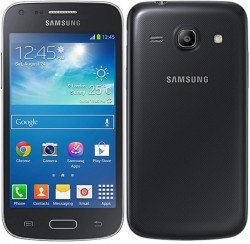
I am writing this tutorial to root Samsung Galaxy Core Plus SM-G3500 because I am getting a lot of request day by day. This is a simple tutorial written in simple words that anyone can understand, even a non techie.
As always, before proceeding further please make sure that you have made a backup (even though this procedure doesn't delete anything) of all your phone data including your personal files, photos, contacts etc.. on your Samsung Galaxy Core Plus SM-G3500.
Please note that rooting will void your warranty and SamsungSFour.Com will not be liable for any damage caused as result of executing the below steps, so kindly proceed at your own risk.
Step by step procedure to root your Samsung Galaxy Core Plus SM-G3500
1. First things first, make sure that you have downloaded and installed the respective Samsung USB drivers for your Galaxy Core Plus SM-G3500.
2. Now you need to download the vRoot rooting software from this link.
3. Once downloaded please install vRoot on your Windows PC.
4. Now enable "USB Debugging Mode" on your Galaxy Core Plus SM-G3500 and connect it to the PC using the USB cable.
5. Once connected open the vRoot app, and you will see a similar window like the one shown in the screenshot below,
6. Now click the "Connect device" button, once clicked you will a similar window like the one given below,
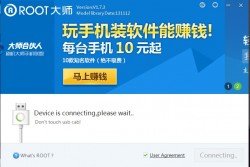
7. When connected the below window will show up,
8. Now click "Root" button in the vRoot window, please check the below screenshot for confirmation,
9. Once you click the "Root" button on the vRoot window your Galaxy Core Plus SM-G3500 will restart and it will be automatically installed with SuperSU App. If everything went as it should be you will see a similar screen like the one given below,
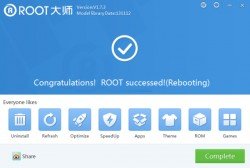
That's it guys if you are seeing the above screen on your PC then your Galaxy Core Plus SM-G3500 is rooted with super user privilages, don't forget to enjoy the maximum with the admin privilages.....
If "How To Root Samsung Galaxy Core Plus SM-G3500?" tutorial really helped you, please give a like/share on social networking websites by using the below given buttons.

Add comment
-
Comments
Sure, i will let you know.
Can i request an tutorial for rooting the SM-G3502T version of the Samsung Galaxy Core Plus?
Thank You.
Thank you..
Dear friend it's because I gave the wrong vRoot download link. Try it now. It will work.
Sure friend, please give me some time.
RSS feed for comments to this post