

Here I would like to share all the possible secret codes of the Android latest flagship from the Korean mobile phone giant, the Samsung Galaxy S5. These secret codes are compatible on all Samsung Galaxy S5 variants like Samsung Galaxy S5 SM-G900F, Samsung Galaxy S5 SM-G900I, Samsung Galaxy S5 SM-G900K Samsung Galaxy S5 SM-G900L, Samsung Galaxy S5 SM-G900S, Samsung Galaxy S5 SM-G900M, Samsung Galaxy S5 SM-G900A and Samsung Galaxy S5 SM-G900T
Advertisement
Secret Codes For Samsung Galaxy S5
1. To check software version of Samsung Galaxy S5: *#1234# (you can do the same from settings menu)
2. To factory reset Samsung Galaxy S5: *#7780#
3. To full factory reset Samsung Galaxy S5: *2767*3855# (no confirmation needed)
4. To enter Galaxy S5 in service mode: *#32489#
5. To check the battery status (ADC, RSSI reading) of Galaxy S5: *#0228#
6. To check software and hardware details of your Samsung Galaxy S5: *#12580*369#
7. To check the various hardware components of your Samsung Galaxy S5: *#0*#
With the above code you can check your galaxy S5's LCD display, Camera, Accelerometer sensor, Proximity sensor, Magnetic sensor, Touch screen, Speaker and many more.
Please check the below screenshot to get an idea about how to enter the secret code to your Samsung Galaxy S5.
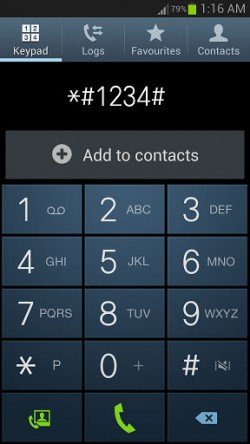
So just type the code to your normal dialling keypad, thats it the code will just execute. You can try this code on all Samsung Galaxy Series Smartphones like Galaxy S, S2, S3, S4 and S5
Please note that SamsungSFour.Com will not be liable for any miss happenings due to the execution of these secret codes, please proceed at your own risk
If any of the codes are not working or you have any other useful codes with you which are not published here, please feel free to post it in the comment section below so that everybody will benefit from it.
If "Secret Codes For Samsung Galaxy S5" tutorial really helped you, please give a like/share on your favourite social networking websites by clicking the below given buttons.
Advertisement
 Galaxy S5

 4 days ago
  0
0  76
76 



Comments
Please read this http://www.samsungsfour.com/tutorials/how-to-resolve-not-registered-on-network-error-on-galaxy-smartphone.html
You have to contact your sim provider. They will provide you with PUK code with which you can unlock it.
That's because your device is a demo piece. Try to install the stock from sammobile.
RSS feed for comments to this post