


This is a simple tutrial to enable "USB Debugging" mode on your Samsung Galaxy Android Smartphone running on Android Lollipop 5.0, 5.0.1 or Higher. This method is compatible on all Samsung Galaxy Smartphones which are running on the latest Android Lollipop firmware like Samsung Galaxy S4, Samsung Galaxy S4 Zoom, Samsung Galaxy S4 Active, Samsung Galaxy S4 Mini, Samsung Galaxy Note 3, Samsung Galaxy S5, Samsung Galaxy S5 Active, Samsung Galaxy Note 4, Samsung Galaxy Note Edge, Samsung Galaxy S5 Plus, Samsung Galaxy S6, Samsung Galaxy S6 Edge, Samsung Galaxy S6 Active, Samsung Galaxy S6 Duos and Samsung Galaxy Alpha.
Steps To Enable USB Debugging On Samsung Galaxy Smartphone Running On Android Lollipop 5.0. 5.0.1 or Higher
1. To start with, please open your app menu and tap on "Settings".
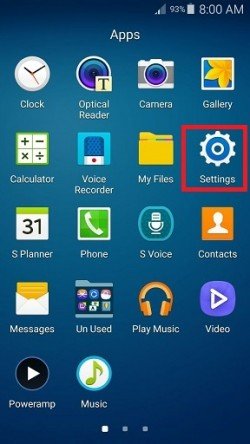
Once clicked you will be guided to the below page;

Here please click the "More" tab and scroll to the bottom to find "About Device" option.
2. Now tap "About device" and you will get the below page.
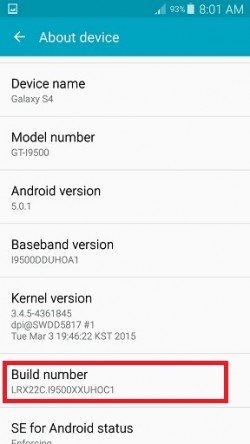
When you are in the above page tap on the "Build number" more than 7 times to enable the "Developer Options". Once enabled go back to the "More" tab and you will be able to see the "Developer options" near to "About device".
4. Now click on "Developer options" and you will be able to see a similar page like the one given below.
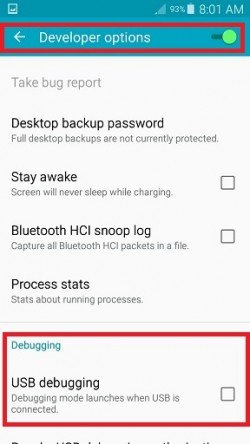
5. From the above page you can either enable or disable the "USB debugging" by just checking or unchecking the white square box.
That's it guys, if you have carefully followed the above steps, you may haven't had any difficulty in enabling the USB debugging on your Samsung Galaxy Android Smartphone running on Android Lollipop 5.0, 5.0.1 or higher.
Normal Queries For This Tutorial
- How To Enable USB Debugging On Samsung Galaxy S4 Running On Android Lollipop 5.0, 5.0.1, 5.0.2 or Higher?
- How To Enable USB Debugging On Samsung Galaxy S4 Zoom Running On Android Lollipop 5.0, 5.0.1, 5.0.2 or Higher?
- How To Enable USB Debugging On Samsung Galaxy S4 Active Running On Android Lollipop 5.0, 5.0.1, 5.0.2 or Higher?
- How To Enable USB Debugging On Samsung Galaxy S4 Mini Running On Android Lollipop 5.0, 5.0.1, 5.0.2 or Higher?
- How To Enable USB Debugging On Samsung Galaxy Note 3 Running On Android Lollipop 5.0, 5.0.1, 5.0.2 or Higher?
- How To Enable USB Debugging On Samsung Galaxy S5 Running On Android Lollipop 5.0, 5.0.1, 5.0.2 or Higher?
- How To Enable USB Debugging On Samsung Galaxy S5 Active Running On Android Lollipop 5.0, 5.0.1, 5.0.2 or Higher?
- How To Enable USB Debugging On Samsung Galaxy Note 4 Running On Android Lollipop 5.0, 5.0.1, 5.0.2 or Higher?
- How To Enable USB Debugging On Samsung Galaxy Note Edge Running On Android Lollipop 5.0, 5.0.1, 5.0.2 or Higher?
- How To Enable USB Debugging On Samsung Galaxy S5 Plus Running On Android Lollipop 5.0, 5.0.1, 5.0.2 or Higher?
- How To Enable USB Debugging On Samsung Galaxy S6 Running On Android Lollipop 5.0, 5.0.1, 5.0.2 or Higher?
- How To Enable USB Debugging On Samsung Galaxy S6 Edge Running On Android Lollipop 5.0, 5.0.1, 5.0.2 or Higher?
- How To Enable USB Debugging On Samsung Galaxy S6 Active Running On Android Lollipop 5.0, 5.0.1, 5.0.2 or Higher?
- How To Enable USB Debugging On Samsung Galaxy S6 Duos Running On Android Lollipop 5.0, 5.0.1, 5.0.2 or Higher?
- How To Enable USB Debugging On Samsung Galaxy Alpha Running On Android Lollipop 5.0, 5.0.1, 5.0.2 or Higher?
If you have faced any issues while enabling USB debugging on your Samsung Galaxy Android Smartphone running on Android Lollipop 5.0, 5.0.1 or higher, please feel free to post it in the comment section below, don't worry I will help you as fast I can.
If "How To Enable USB Debugging On Galaxy Smartphone (Lollipop 5.0 or Higher)?" tutorial really helped you, please give a like/share on social networking websites by using the below given buttons.

