


Most of you may not be aware that your Samsung Galaxy Smartphone also comes with the option to alert you through LED flash light for calls, SMS, IM messages, whatsapp messages etc like in apple iphones. If you are aware (or not aware) and if you don't know the settings where to enable it then please follow my tutorial which will enable your Samsung Galaxy Smartphone running on Android KitKat 4.4.2 or 4.4.4 to alert/notify you through LED flash light.
Advertisement
Steps to enable/disable LED Flash Light Alert/Notification On Galaxy Smartphone running On Android KitKat 4.4.2 or higher
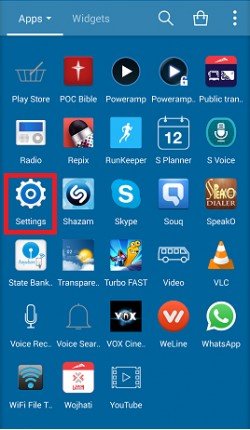
1. First tap on "Settings" from the app drawer of your Galaxy Smartphone as shown below.
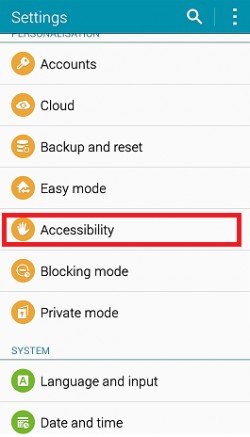
2. Now once inside the settings menu tap on "Accessibility".
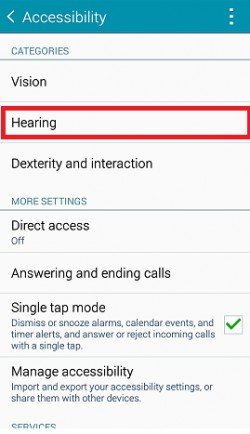
3. Now here tap on "Hearing".
4. Here you will get the option to enable or disable LED Flash light notification for calls, messages etc.
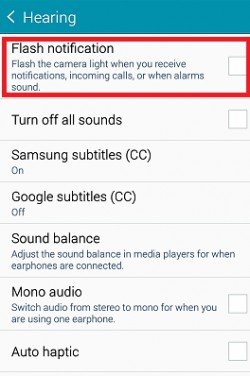
a.) Disabled state above.
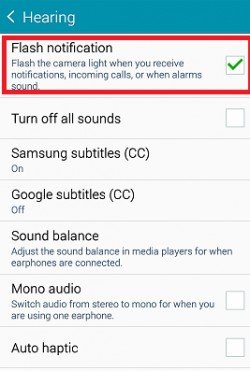
b.) Enables state above.
That's it guys, you have successfully enabled/disabled the LED flash light alert/notification on your Samsung galaxy smartphone.
Normal queries for this tutorial
- How To Enable LED Flash Light Alert On Samsung Galaxy Note Edge
- How To Enable LED Flash Light Alert On Samsung Galaxy Note 4
- How To Enable LED Flash Light Alert On Samsung Galaxy A7
- How To Enable LED Flash Light Alert On Samsung Galaxy A5
- How To Enable LED Flash Light Alert On Samsung Galaxy A3
- How To Enable LED Flash Light Alert On Samsung Galaxy E5
- How To Enable LED Flash Light Alert On Samsung Galaxy E7
- How To Enable LED Flash Light Alert On Samsung Galaxy S3
- How To Enable LED Flash Light Alert On Samsung Galaxy Note 2
- How To Enable LED Flash Light Alert On Samsung Galaxy S4
- How To Enable LED Flash Light Alert On Samsung Galaxy S4 Zoom
- How To Enable LED Flash Light Alert On Samsung Galaxy S4 Active
- How To Enable LED Flash Light Alert On Samsung Galaxy S4 Mini
- How To Enable LED Flash Light Alert On Samsung Galaxy Note 3
- How To Enable LED Flash Light Alert On Samsung Galaxy Tab 2
- How To Enable LED Flash Light Alert On Samsung Galaxy Tab 3
- How To Enable LED Flash Light Alert On Samsung Galaxy Mega
- How To Enable LED Flash Light Alert On Samsung Galaxy Note 2
- How To Enable LED Flash Light Alert On Samsung Galaxy Tab 3
- How To Enable LED Flash Light Alert On Samsung Galaxy Tab 2
- How To Enable LED Flash Light Alert On Samsung Galaxy Note 8.0
- How To Enable LED Flash Light Alert On Samsung Galaxy S5
- How To Enable LED Flash Light Alert On Samsung Galaxy S5 Active
- How To Enable LED Flash Light Alert On Samsung Galaxy Grand 2
- How To Enable LED Flash Light Alert On Samsung Galaxy Note 4
- How To Enable LED Flash Light Alert On Samsung Galaxy S5 Plus
If you have faced any issues while enabling LED flash light alert on Samsung Galaxy Android Smartphone running on KitKat 4.4.2+, please feel free to post it in the comment section below, don't worry I will help you as fast I can.
If "How To Enable LED Flash Light Alert On Galaxy Smartphone On KitKat 4.4.2+?" tutorial really helped you, please give a like/share on social networking websites by using the below given buttons.
Advertisement


