


Hi friends, today I am going to help you in rooting almost all of your Samsung Galaxy Smartphones Without the help of PC, which means directly using your Galaxy Smartphone itself. This is achieved by the KingRoot APK which is compatible with all Samsung Galaxy Smartphones running on Android Marshmallow 6.0, Lollipop 5.1.1, 5.1, 5.0.2, Android KitKat 4.4, Android Jelly Bean 4.3 and Android 4.2.2.
Ad
But, please note that rooting will void your warranty, but you can always unroot it to reinstate warranty. SamsungSFour.Com will not be liable for any damage caused as a result of executing the below given steps.
Before proceeding with the procedure given here please make sure that you have made a complete backup of your phone memory including contacts, photos etc. Also the phone battery should be charged to a min of 80%.
Steps To Root All Samsung Galaxy Android Smartphones running on Android Marshmallow 6.0, Lollipop 5.1.1, 5.1, 5.0.2, Android KitKat 4.4, Android Jelly Bean 4.3 and Android 4.2.2. Firmware
1. First please download the KingRoot APK using your Galaxy Smartphone from the below given link.
Please ignore the warnings you are getting from your phone and proceed.
2. Once downloaded install the King Root apk on your Samsung Galaxy Smartphone.
Please note that you have to check mark "Unknown Sources" from Settings-> Security which will allow you to install apps other than from Google Play Store.
3. Once installed please open the KingRoot app and you will see a similar screen like the one given below.

If your device is not supported you will get the below screen.

4. Now tap on "Start Root" to start the rooting procedure on your Samsung Galaxy Smartphone. Rest of the process is automated and it will take some time. Once completed you will see a similar screen like the one below. (if it was successful)
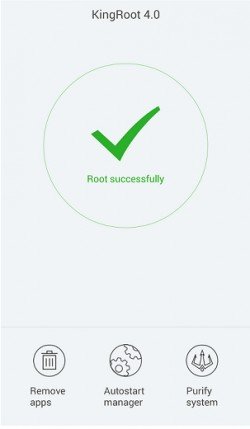
That's it guys your Galaxy Smartphone is successfully rooted with superuser privileges. You can confirm the root by any of the root checker apps available in the Google Play Store.
Normal queries for this root method
- How To Root Samsung Galaxy S7
- How To Root Samsung Galaxy S7 Edge
- How To Root Samsung Galaxy J1
- How To Root Samsung Galaxy A9
- How To Root Samsung Galaxy A7 (2016)
- How To Root Samsung Galaxy A5 (2016)
- How To Root Samsung Galaxy A3 (2016)
- How To Root Samsung Galaxy J3
- How To Root Samsung Galaxy View
- How To Root Samsung Galaxy On7
- How To Root Samsung Galaxy On5
- How To Root Samsung Z3
- How To Root Samsung Galaxy J1 Ace
- How To Root Samsung Galaxy Note5 (CDMA)
- How To Root Samsung Galaxy Note5
- How To Root Samsung Galaxy Note5 Duos
- How To Root Samsung Galaxy S6 edge+ (CDMA)
- How To Root Samsung Galaxy S6 edge+
- How To Root Samsung Galaxy S6 edge+ Duos
- How To Root Samsung Galaxy Folder
- How To Root Samsung Galaxy A8 Duos
- How To Root Samsung Galaxy A8
- How To Root Samsung Galaxy V Plus
- How To Root Samsung Galaxy J7
- How To Root Samsung Galaxy J5
- How To Root Samsung Galaxy Tab 4 10.1
- How To Root Samsung Galaxy S6
- How To Root Samsung Galaxy Tab 3 P5200
- How To Root Samsung N9106 (10.1 inches)
- How To Root Samsung GALAXY T805S
- How To Root Samsung T950S
- How To Root Samsung XE7008
- How To Root Samsung Galaxy S5 4G SM-G900
- How To Root Samsung Galaxy A3 Duos SM-A300H
- How To Root Samsung Galaxy A3 SM-A3009
- How To Root Samsung Galaxy A3 SM-A300M
- How To Root Samsung Galaxy A3 SM-A300YZ
- How To Root Samsung Galaxy A3 SM-A300G
- How To Root Samsung Galaxy A3 SM-A300F
- How To Root Samsung Galaxy A3 SM-A3000
- How To Root Samsung Galaxy A3 SM-A300FU
- How To Root Samsung Galaxy A5 Duos SM-A500H
- How To Root Samsung Galaxy A5 SM-A5009
- How To Root Samsung Galaxy A5 SM-A500G
- How To Root Samsung Galaxy A5 SM-A500M
- How To Root Samsung Galaxy A5 SM-A500F
- How To Root Samsung Galaxy A5 SM-A5000
- How To Root Samsung Galaxy A5 SM-A500YZ
- How To Root Samsung Galaxy A5 SM-A500Y
- How To Root Samsung Galaxy A5 SM-A500l
- How To Root Samsung Galaxy A5 SM-A500S
- How To Root Samsung Galaxy A5 SM-A500FU
- How To Root Samsung Galaxy A7 SM-A700H
- How To Root Samsung Galaxy A7 SM-A700F
- How To Root Samsung Galaxy A7 SM-A7009
- How To Root Samsung Galaxy A7 SM-A700K
- How To Root Samsung Galaxy A7 SM-A700S
- How To Root Samsung Galaxy A7 SM-A700FD
- How To Root Samsung Galaxy A7 SM-A7000
- How To Root Samsung Galaxy A7 SM-A700YD
- How To Root Samsung Galaxy Tab S SM-T805Y
- How To Root Samsung Galaxy Tab S SM-T805C
- How To Root Samsung Galaxy Tab S SM-T807T
- How To Root Samsung Galaxy Tab S SM-T805M
- How To Root Samsung Galaxy Tab S SM-T807A
- How To Root Samsung Galaxy Tab S SM-T805
- How To Root Samsung Galaxy S4 GT-I9506
- How To Root Samsung Galaxy Core Prime SM-G360BT
- How To Root Samsung Galaxy Core Prime SM-G360P
- How To Root Samsung SM-S820l
- How To Root Samsung Galaxy Core Prime SM-G360M
- How To Root Samsung Galaxy Core PrimeSM-G360F
- How To Root Samsung Galaxy Core LTE SM-G3518
- How To Root Samsung Galaxy Tab 4 7.0 3G SM-T231
- How To Root Samsung Galaxy Tab 4 7.0 LTE SM-T235
- How To Root Samsung Galaxy Tab 4 7.0 SM-T235Y
- How To Root Samsung Galaxy Note 4 DUOS SM-N9106W
- How To Root Samsung Galaxy E5 SM-E500H
- How To Root Samsung Galaxy E5 SM-E500M
- How To Root Samsung Galaxy E5 SM-E500F
- How To Root Samsung Galaxy E7 SM-E700H
- How To Root Samsung Galaxy E7 SM-E7009
- How To Root Samsung Galaxy E7 SM-E700F
- How To Root Samsung Galaxy E7 SM-E700M
- How To Root Samsung Galaxy E7 SM-E7000
- How To Root Samsung Galaxy Express SGH-I437
- How To Root Samsung Galaxy Grand Prime SM-G530H
- How To Root Samsung Galaxy Grand Prime SM-G530BT
- How To Root Samsung Galaxy Grand Prime SM-G5309W
- How To Root Samsung Galaxy Grand Prime SM-G530F
- How To Root Samsung Galaxy Grand Prime SM-G530M
- How To Root Samsung Galaxy Grand Prime SM-G530MU
- How To Root Samsung Galaxy Grand Prime SM-G5308W
- How To Root Samsung Galaxy Grand Prime SM-G5306W
- How To Root Samsung Galaxy Grand Prime SM-G530Y
- How To Root Samsung Galaxy Light SGH-T399N (T-Mobile)
- How To Root Samsung Galaxy Grand Max SM-G720N0
- How To Root Samsung Galaxy Grand Max SM-G720AX
- How To Root Samsung Galaxy Grand 3 LTE SM-G7200
- How To Root Samsung Galaxy Grand Prime SM-G530AZ
- How To Root Samsung Galaxy Grand Prime SM-G530FZ
- How To Root Samsung Galaxy S II GT-I9100
- How To Root Samsung Galaxy Note GT-N7000
- How To Root Samsung Galaxy Tab GT-P5310
- How To Root Samsung GALAXY Note 3 SM-N9009
- How To Root Samsung Galaxy Note 3 Duos SM-N9002
- How To Root Samsung Galaxy Note 3 SM-N9008
- How To Root Samsung Galaxy Note 3 SM-N9006
- How To Root Samsung Galaxy Note 3 SM-N9000Q
- How To Root Samsung Galaxy Note 3 SM-N900
- How To Root Samsung Levant SM-N900
- How To Root Samsung Galaxy Ace Style SM-G357M
- How To Root Samsung Galaxy Ace Style SM-G357FZ
- How To Root Samsung Galaxy Note 3 Neo SM-N7500Q
- How To Root Samsung Galaxy Note 3 Neo SM-N750
- How To Root Samsung Galaxy Note 3 Neo SM-N7509V
- How To Root Samsung Galaxy Note 3 Neo SM-N7505l
- How To Root Samsung Galaxy Note 3 Neo SM-N7505
- How To Root Samsung Galaxy Note3 Lite SM-N7508V
- How To Root Samsung Galaxy Note 3 Neo SM-N7506V
- How To Root Samsung Galaxy Note 3 SM-N7507
- How To Root Samsung Galaxy Note 3SM-N900W8
- How To Root Samsung Galaxy Note 3 SM-N9008V
- How To Root Samsung Galaxy J SGH-N075T
- How To Root Samsung Galaxy Note 3 SM-N9008S
- How To Root Samsung Galaxy Note 3 SM-N9005
- How To Root Samsung Galaxy Mega I9158
- How To Root Samsung Galaxy S4 GT-I9502
- How To Root Samsung Galaxy S4 SCH-I959
- How To Root Samsung Galaxy S4 GT-I9500
- How To Root Samsung Galaxy S4 LTE SHV-E300K
- How To Root Samsung Galaxy S4 SHV-E300l
- How To Root Samsung Galaxy S4 SHV-E300S
- How To Root Samsung Galaxy S 4 (Sprint) SPH-l720
- How To Root Samsung Galaxy S4 GT-I9505
- How To Root Samsung Galaxy Core 2 SM-G355M
- How To Root Samsung Galaxy Core Max Duos SM-G5109
- How To Root Samsung Galaxy Core Max SM-G5108Q
- How To Root Samsung Galaxy Core Max SM-G5108
- How To Root Samsung Galaxy Tab S 8.4 4G SM-T705Y
- How To Root Samsung Galaxy Tab S SM-T705C
- How To Root Samsung Galaxy Tab SM-T707A (AT&T)
- How To Root Samsung Galaxy Tab S SM-T705
- How To Root Samsung Galaxy S5 SM-G9009W
- How To Root Samsung Galaxy S5 SM-G9008W
- How To Root Samsung Galaxy S5 SM-G900M
- How To Root Samsung Galaxy S5 SM-G900F
- How To Root Samsung Galaxy Note 3 N900T (T-Mobile)
- How To Root Samsung Galaxy S5 SM-G9006V
- How To Root Samsung Galaxy S5 mini SM-G800M
- How To Root Samsung Galaxy S5 mini SM-G800F
- How To Root Samsung Galaxy S5 LTE-A Prime SM-G906K
- How To Root Samsung Galaxy S5 Prime SM-G906l
- How To Root Samsung Galaxy S5 LTE SM-G906S
- Galaxy Note 10.1 SM-P601
- How To Root Samsung Galay S3 GT-I9300
- How To Root Samsung Galay S3 GT-I9308
- How To Root Samsung SM-C1116
- How To Root Samsung SM-C115M
- How To Root Samsung SM-C115
- How To Root Samsung SM-G750A
- How To Root Samsung SM-G750F
- How To Root Samsung GT-I9158V
- Samsung Galaxy Tab 3 GT-P5200
- How To Root Samsung N9106
- How To Root Samsung T950S
- How To Root Samsung SM-W2014
- How To Root Samsung SM-G7106
- How To Root Samsung SM-G7105
- How To Root Samsung SM-G7108V
- How To Root Samsung SM-T2519
- How To Root Samsung SM-T2556
- How To Root Samsung SM-G360G
- How To Root Samsung SM-G360GY
- How To Root Samsung GT-I9301I
- How To Root Samsung T805S
- How To Root Samsung N9106
- How To Root Samsung N9106Hd
- How To Root Samsung SC-01G
- How To Root Samsung GT-I9192I
- How To Root Samsung SM-G850Fq
- How To Root Samsung SM-G850k
- How To Root Samsung SM-G850l
- How To Root Samsung SM-G850S
- How To Root Samsung SM-G850M
- How To Root Samsung SM-G850F
- How To Root Samsung SM-G850Y
- How To Root Samsung SM-N9000
- How To Root Samsung GT-N7100
- How To Root Samsung T950S
- How To Root Samsung SM-N915K
- How To Root Samsung SM-N915l
- How To Root Samsung SM-N915S
- How To Root Samsung Galaxy K Zoom SM-N915FY
- How To Root Samsung GALAXY Note Edge SM-N915W8
- How To Root Samsung GALAXY Note Edge SM-N915G
- How To Root Samsung GALAXY Note Edge SM-N915T
- How To Root Samsung GALAXY Note Edge SM-N915A
- How To Root Samsung GALAXY Note Edge SM-N915F
- How To Root Samsung GALAXY Note Edge SM-N9150
- How To Root Samsung Galaxy Note 4 SM-N910H
- How To Root Samsung Galaxy Note 4 SM-N910K
- How To Root Samsung Galaxy Note 4 LTE SM-N910l
- How To Root Samsung Galaxy Note 4 SM-N910S
- How To Root Samsung Galaxy Note 4 SM-N910C
- How To Root Samsung Galaxy Note 4 SM-N910U
- How To Root Samsung Galaxy Note 4 SM-N910W8
- How To Root Samsung Galaxy Note 4 SM-N910G
- How To Root Samsung Galaxy Note 4 SM-N9109W
- How To Root Samsung Galaxy S6 SM-G920F
- How To Root Samsung Galaxy Note 4 Duos SM-9100
- How To Root Samsung Galaxy Note 4 SM-N910P (Sprint)
- How To Root Samsung Galaxy Note 4 SM-N910T (T-Mobile)
- How To Root Samsung Galaxy Note 4 SM-N910A
- How To Root Samsung Galaxy Note Pro 12.2 3G SM-P901
- How To Root Samsung Galaxy Mega 2 SM-G750H
- How To Root Samsung Galaxy Mega 2 SM-G7509
- How To Root Samsung Galaxy Mega 2 SM-G7508Q
- How To Root Samsung Galaxy Core Lite LTE SM-G3588V
- How To Root Samsung Galaxy Core Lite SM-G3586V
- How To Root Samsung SM-G9092
- How To Root Samsung Galaxy SM-G9098
- How To Root Samsung Galaxy Ace 4 LTE SM-G313MU
- How To Root Samsung Galaxy Ace 4 SM-G313F
If you have faced any issues while rooting your Samsung Galaxy Smartphone running Android Marshmallow 6.0, Lollipop 5.1.1, 5.1, 5.0.2, Android KitKat 4.4, Android Jelly Bean 4.3 or Android 4.2.2. Firmware, please feel free to post it in the comment section below, don't worry I will help you as fast I can.
If "How To Root All Samsung Galaxy Smartphones Without PC?" tutorial really helped you, please give a like/share on social networking websites by using the below given buttons.
Ad



Comments
Yes it's very easy as rooting.
Did already, still the same problem.
Please download the latest version of kingroot apk from the updated link and enjoy the root. http://www.samsungsfour.com/downloads/downloads-for-rooting-all-samsung-galaxy-smartphones-without-pc.html
RSS feed for comments to this post