


Hi guys, this tutorial will help you to root your favourite Samsung Galaxy Star Duos GT-5282 using the pre-rooted firmware. By rooting your phone you will become the true owner of it with mighty root access privileges.
Ad
But, please note that rooting will void your warranty, but you can always unroot it to reinstate warranty. SamsungSFour.Com will not be liable for any damage caused as a result of executing the below given steps.
Before proceeding with the procedure given here please make sure that you have made a complete backup of your phone memory including contacts, photos etc. Also the phone battery should be charged to a min of 80%.
Steps To Root Samsung Galaxy Star Duos GT-5282 using the pre-rooted firmware
1. First please download the files for rooting Samsung Galaxy Star Duos GT-5282 from the below given link;
a. Pre-Rooted Firmware For Star Duos GT-5282
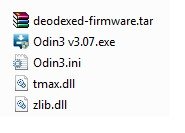
2. Once downloaded extract it, check the below screenshot to confirm the file contents;
3. Now enable "USB debugging mode" on your Samsung Galaxy Star Duos GT-5282 from Settings->Developer Options->USB Debugging. Alternately you can try the detailed tutorial given below for enabling USB debugging mode on your device.
How To Enable USB Debugging Mode On Samsung Android 4.3 Phone (or up)?
4. Once it is done you have to enter your Samsung Galaxy Star Duos GT-5282 into "Download Mode", to enter switch off your device and press and hold "Volume Down+Home+Power buttons at the same time until you get the warning screen like the one given below.

Now please click "Volume Up" button to confirm and you will enter into the "Download Mode". The below screenshot shows you the final download mode screen.

4. Now it is the time to open Odin as administrator and to connect your Samsung Galaxy Star Duos with your PC using the USB cable. An "Added" message from the Odin confirms a successful connection. Now click the "PDA" button and select the extracted ".tar.md5" file from your PC desktop.
Please make sure that “Auto Reboot” and “F. Reset Time” options are only check marked in the Odin.
5. Once confirmed click the "Start" button in the Odin and wait for the rooting procedure to get completed. When it's completed your the device will restart and it will attain superuser privileges.
You can confirm whether the procedure was successful or not from the "Pass" message coming from the Odin.If you get the pass message then you have successfully rooted your Star Duos...Enjoy..
If you have faced any issues while rooting your Samsung Galaxy Star Duos GT-5282, please feel free to post it in the comment section below, don't worry I will help you as fast I can.
If "How To Root Samsung Galaxy Star GT-S5282?" tutorial really helped you, please give a like/share on social networking websites by using the below given buttons.
Ad



Comments
What happens when you are trying to swith it on. If it's in a boot loop try this; http://www.samsungsfour.com/tutorials/how-to-resolve-android-boot-loop.html
Odin v.3 engine (ID:4)..
File analysis..
SetupConnection ..
Initialzation..
Get PIT for mapping..
Firmware update start..
system.img
NAND Write Start!!
RQT_CLOSE !!
RES OK !!
Removed!!
Remain Port .... 0
All threads completed. (succeed 1 / failed 0)
Added!!
so i can't power on my phone.
plz help me..................................
i want it again unrooted or rooted.
RSS feed for comments to this post