
.jpg)
.jpg)
.jpg)
.jpg)
.jpg)
.jpg)
.jpg)
.jpg)
.jpg)
.jpg)
.jpg)
.jpg)
.jpg)
.jpg)
.jpg)
.jpg)


If you are searching for Samsung Galaxy S3 Secret Codes you have came to the right place. Here you can find all possible secret codes your Galaxy S3 Smartphone. This codes are compatible on all S3 variants like Samsung I9305 Galaxy S III, Samsung I9300 Galaxy S III, Samsung I8190 Galaxy S III mini and Samsung I9300I Galaxy S3 Neo.
Before proceeding further please To check the below screenshot to get an idea about how to enter these codes to your Galaxy S3
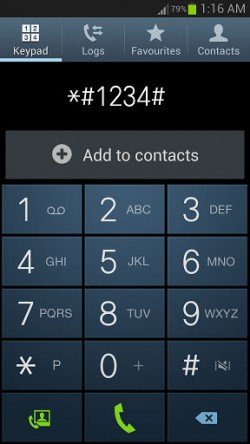
So just type the code to your normal dialling keypad, that’s it the code will just execute.
All Secret Codes Samsung Galaxy S3
- To check Audio Loopback Control : *#0283#
- To check IMEI number : *#06#
- To check WLAN MAC Address : *#232338#
- To enter General Test Menu : *#0*#
- To check Vibra Motor Test Mode : *#0842#
- To check Real Time Clock Test : *#0782#
- To check General Test Mode : *#0*#
- To check Diagnostic Configuration : *#9090#
- To check USB I2C Mode Control : *#7284#
- To enable/disable Disabling Fast Dormancy : *#9900#
- Update TSP/TSK Firmware : *#2663#
- To check Data Create Menu : *#273283*255*3282*#
- To check Data Usage Status : *#3282*727336*#
- Remap Shutdown to End Call TSK : *#7594#
- Camera Firmware Update : *#34971539#
- Quick Test menu, To check every feature on S3 : *#7353#
- To check Buyer or CSC : *#272*IMEI#
- To check Software and Hardware information, PDA, CSC, MODEM (Firmware Version) : *#1234#
- To check hardware version : *#2222#
- To check GSM status information : *#0011#
- Full Factory Reset : *2767*3855# (no confirm, will just execute the code )
- To check hardware and stware : *#12580*369#
- To enter Service Mode : *#0011# or *#197328640#
- To enter Service mode (Ciphering Info) Battery status (ADC, RSSI reading) : *#0228#
If any of the codes are not working or you have any other useful codes with you which are not published here, please feel free to post it in the comment section below so that everybody will benefit from it.
If "All Secret Codes of Samsung Galaxy S3" tutorial really helped you, please give a like/share on social networking websites by using the below given buttons.

 galaxy s3 secret codes
Add comment
-
Comments
Sorry there is no such code available.
Did you mean "Download Mode"?
It will not work as it is only for the international versions.
It's working on 4.3. On 4.4.2 we didn't quite tested it. The firmware is also a deciding factor.
Try this code *#0*# and test whether it's vibrating. If it's not take a backup and hard reset your device.
RSS feed for comments to this post